> ## Documentation Index
> Fetch the complete documentation index at: https://docs.routera.io/llms.txt
> Use this file to discover all available pages before exploring further.
# Creating capacities
> Set limits on how many records users or teams can own, based on field values.
Capacities help you cap workload by tracking how many records match criteria on a data field—for example, open deals in a given stage. You define the capacity once, then assign **max** limits to users or teams.
## Create a capacity
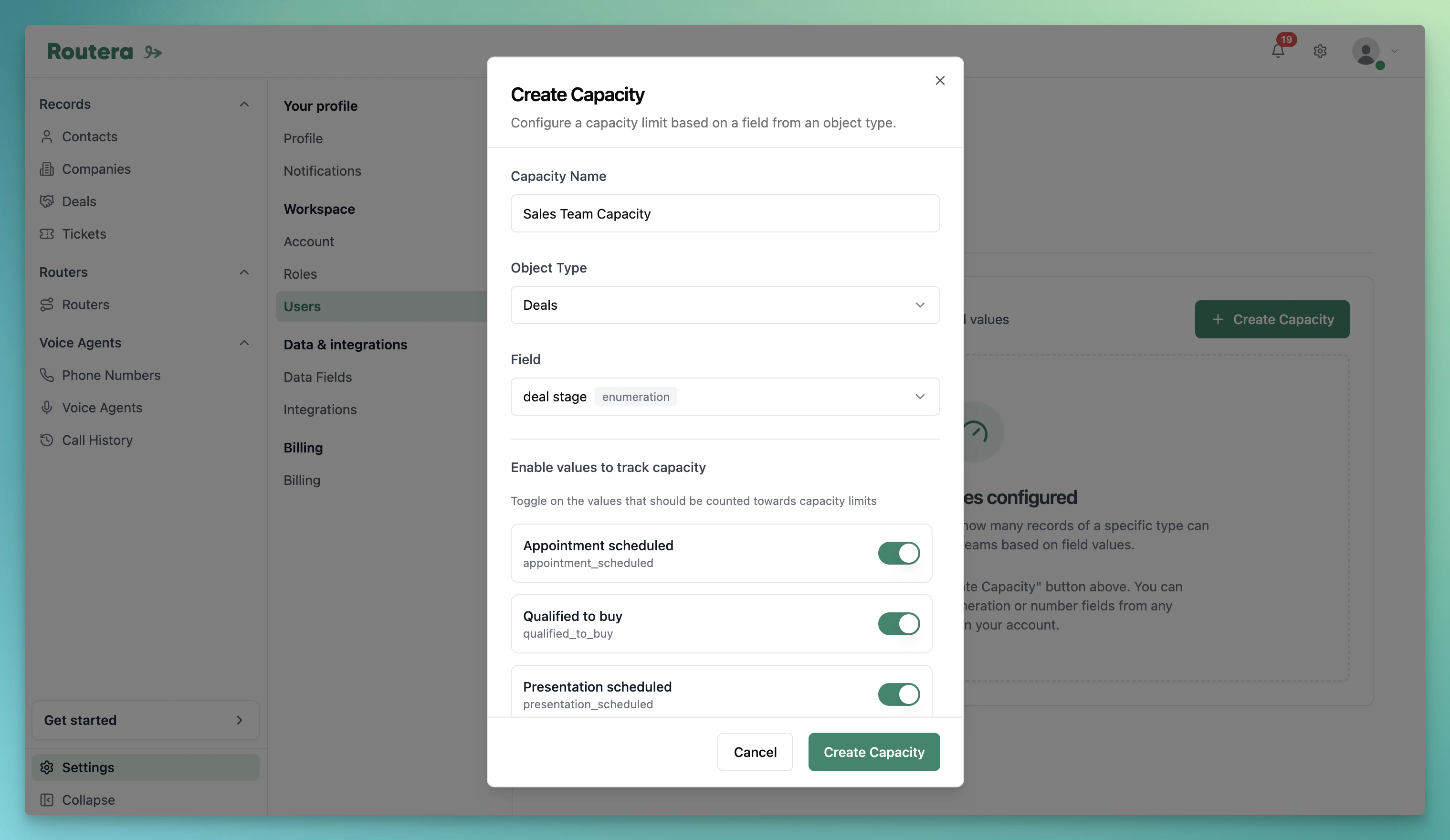
1. Open **Settings** → **Users** → **Capacities**.
2. Click **Create Capacity**.
3. Enter a **name**, choose an **object type** and **enumeration field** (each field can only be used once).
4. Enable the field values that should count toward the limit.
5. Optionally turn on **reset counters monthly**, then click **Create Capacity**.
 If HubSpot is connected and the field is not mapped, you will see a warning. Map the field under **Settings** → **Integrations** so values stay in sync—see [Integrate HubSpot](/kb/integrate-hubspot).
## Assign users and teams
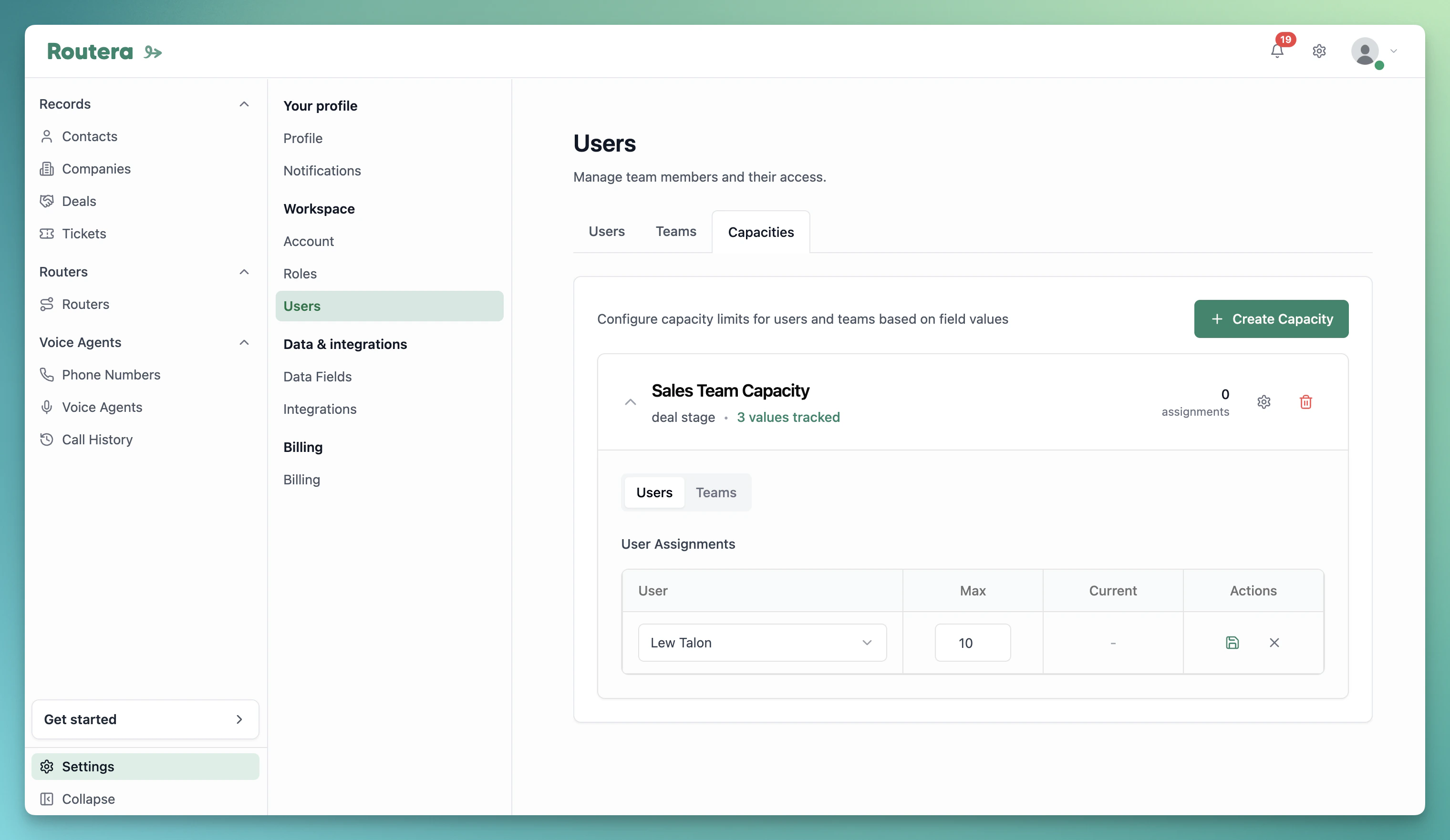
1. Expand a capacity card on the **Capacities** page.
2. Open the **Users** or **Teams** tab.
3. Click **Add User** or **Add Team**, choose who to assign, set **Max**, and save.
4. Use **Current** and the progress indicator to see usage (green below 70%, yellow 70–89%, red 90%+).
If HubSpot is connected and the field is not mapped, you will see a warning. Map the field under **Settings** → **Integrations** so values stay in sync—see [Integrate HubSpot](/kb/integrate-hubspot).
## Assign users and teams
1. Expand a capacity card on the **Capacities** page.
2. Open the **Users** or **Teams** tab.
3. Click **Add User** or **Add Team**, choose who to assign, set **Max**, and save.
4. Use **Current** and the progress indicator to see usage (green below 70%, yellow 70–89%, red 90%+).
 ## Edit or delete
* **Assignment** — use edit or delete on a row in the **Users** or **Teams** tab to change **Max** or remove someone.
* **Capacity settings** — use the settings control on the capacity card to change the name or which field values count.
* **Delete capacity** — removes the capacity and all assignments.
Use the **Filter** at the top of the list to narrow by object type when you have many capacities.
Configure fields under **Settings** → **Data Fields** before creating capacities, and add [users](/kb/inviting-users) or [teams](/kb/creating-teams) you plan to assign.
## Edit or delete
* **Assignment** — use edit or delete on a row in the **Users** or **Teams** tab to change **Max** or remove someone.
* **Capacity settings** — use the settings control on the capacity card to change the name or which field values count.
* **Delete capacity** — removes the capacity and all assignments.
Use the **Filter** at the top of the list to narrow by object type when you have many capacities.
Configure fields under **Settings** → **Data Fields** before creating capacities, and add [users](/kb/inviting-users) or [teams](/kb/creating-teams) you plan to assign.